
PLATFORM CHECK
What it is. What DRAM LAB shows beyond your own settings: limits that sit in the memory controller, in Infinity Fabric or in AGESA, the AMD firmware inside every BIOS. A real case from the author's PC, and how to check a BIOS update yourself.
Why use it. When a timing gives less than it should, or a BIOS update changes memory speed, it helps to know whether the cause is your settings or the platform. DRAM LAB measures each memory channel on its own and saves the BIOS and AGESA version with every run, so such a difference becomes visible.
A real case: one channel follows CL less
A real case is in the screenshots of DRAM LAB. On the author's Ryzen 9 9950X3D a read from an open row takes 60.1 ns on UMC0 and 63.8 ns on UMC1: 3.7 ns more, with the same timings and the same kind of modules on both channels. Row Closed and Row Conflict differ by less than 0.8 ns between the channels, so the road to both channels is equally long; only the open-row read is slower on UMC1. In an average of both channels this shrinks to 1.8 ns, and in an ordinary benchmark, which mixes every kind of read, it is hard to see at all.
The author dug further, at DDR5-6000:
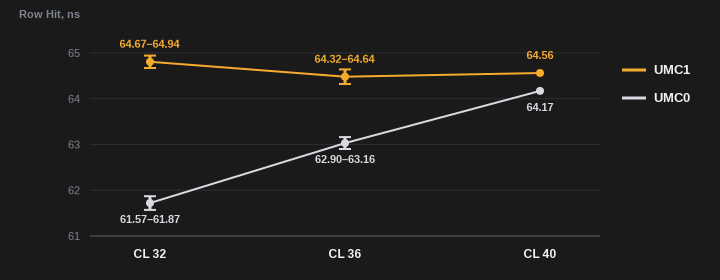
- UMC1 hardly follows CL. At CL 32, 36 and 40 its Row Hit stayed between 64.3 and 64.9 ns, while UMC0 rose from about 61.7 to 64.2 ns. At CL 40 the two channels nearly met.
- It is not the modules. All four modules were moved to the other channel, and the difference stayed with UMC1.
- It is not a setting. The timing registers of both memory controllers read the same.
- It follows FCLK. Raising FCLK from 2000 to 2133 MHz made the open-row read 3 ns faster on UMC1 and only 0.6 ns faster on UMC0: the limit sits on the processor side, in Infinity Fabric or the memory controller, not in the memory.
So the limit sits on AMD's side: in the memory controller and Infinity Fabric, or in the AGESA firmware that sets them up. These measurements do not name the exact cause yet. Comparing BIOS versions with the same settings shows whether the firmware changes it, and DRAM LAB is the tool for that test. The odd timings that work as even ones with GDM ON, from Example 1 of DRAM LAB, are the same kind of finding: BIOS shows one value, the memory controller uses another.
Check a BIOS update yourself
- Before the update, run DRAM LAB twice with your usual settings, with a restart in between.
- Update the BIOS, set exactly the same memory settings and run it twice again.
- Compare an old run with a new one in the DRAM Timings view, channel by channel. The headline names BIOS and AGESA as the changed settings.
The pairs from the same BIOS show how far your system drifts between restarts. A channel that moves well beyond that, or channels that drift apart, point to a change that came with the new BIOS, not from your settings.
Something wrong or missing on this page? Tell us in Discord.