
ANVIL
What it is. HYDRA's system memory (RAM) stability test. It locks a large share of the free RAM in physical memory, fills it with test data and checks it over and over for any bit that comes back wrong.
Why use it. A memory overclock or tight timings can look stable in games and still corrupt files or crash Windows hours later. Anvil finds such errors and shows how often and where they appear, so you can check a DCFR preset or your own timings before you rely on them.
The screen at a glance
The ANVIL (DRAM TEST) button in the DRAM section of the TESTS tab opens this window. The example shows the Custom preset.
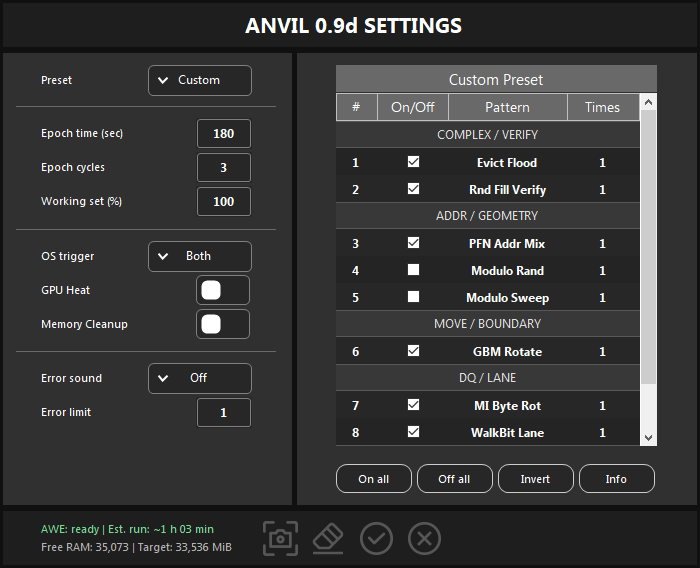
- 1Preset. Typical, Detailed or Custom. See Presets.
- 2Epoch time, Epoch cycles, Working set. How long each pattern runs, how many times the whole schedule repeats and how much free RAM is tested.
- 3OS trigger, GPU Heat, Memory Cleanup. Light Windows input during the test, a GPU heat load and a cache cleanup before the start. See Settings.
- 4Error sound and Error limit. The alarm for new errors and how many errors stop the run.
- 5Pattern table. The patterns of the selected preset and their repeats. See Patterns.
- 6Groups. Patterns grouped by what they stress.
- 7Table buttons. Turn every Custom pattern on or off, invert the selection, open the pattern guide.
- 8AWE, estimate and memory. Whether Anvil can lock memory, the expected run time, the free RAM and how much of it will be tested. See AWE, run time and memory.
- 9Buttons. Screenshot, reset to the recommended values, start (Enter), cancel (Esc).
Presets
The Preset list chooses what Anvil runs. Switching presets keeps all numeric settings; the reset button at the bottom applies the recommended values of the selected preset.
| Preset | What it runs | Recommended |
|---|---|---|
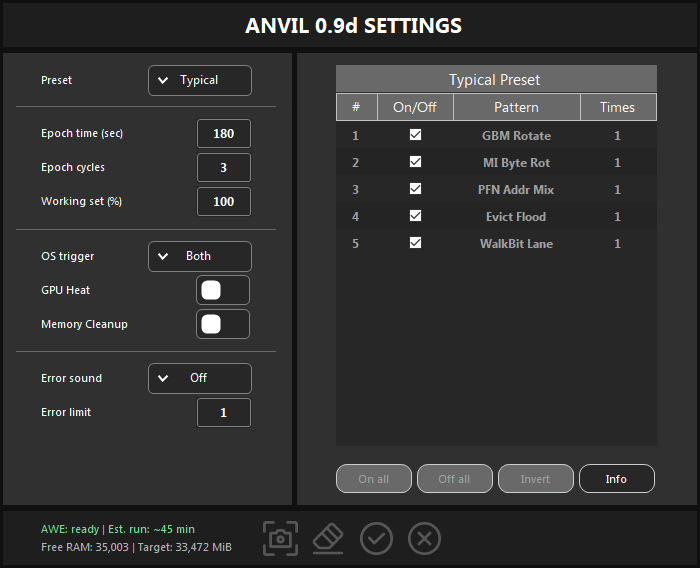
| Typical | The five strongest patterns, without the Modulo ones: GBM Rotate, MI Byte Rot, PFN Addr Mix, Evict Flood and WalkBit Lane. | 180 s, 3 cycles |
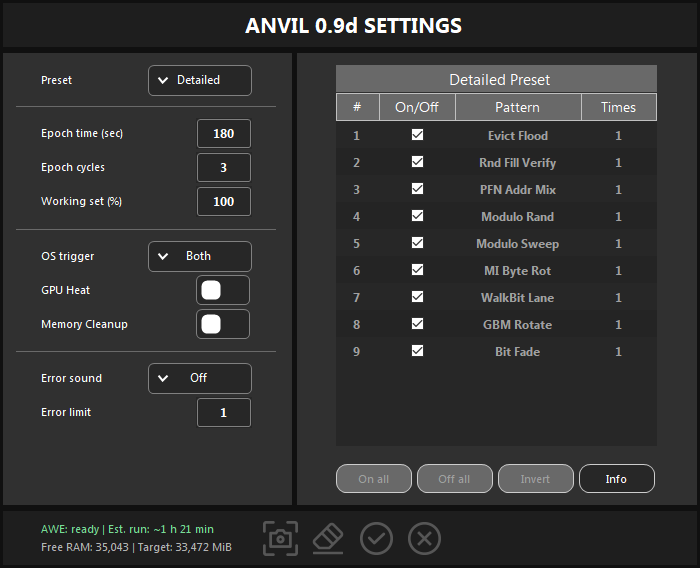
| Detailed | All nine patterns. | 180 s, 5 cycles |
| Custom | Your own selection, run in table order. Reset turns on every pattern except Modulo Rand and Modulo Sweep. | 180 s, 3 cycles |
Every preset recommends a Working set of 100 %.
Patterns
For the Custom preset, the On/Off box selects a pattern and Times (1 to 10) runs it again as a separate full-length run. The table groups the patterns by what they stress.
| Pattern | Group | What it does |
|---|---|---|
| Evict Flood | COMPLEX / VERIFY | Heavy memory copy and compare traffic with a verification pass. |
| Rnd Fill Verify | COMPLEX / VERIFY | Random data fill with repeated hot verification. |
| PFN Addr Mix | ADDR / GEOMETRY | Data derived from addresses across groups of physical pages. |
| Modulo Rand | ADDR / GEOMETRY | Random pressure on groups of addresses, with verification. |
| Modulo Sweep | ADDR / GEOMETRY | Repeated sweeps over groups of addresses in several layouts. |
| GBM Rotate | MOVE / BOUNDARY | Block-move pressure with rotated records and verification. |
| MI Byte Rot | DQ / LANE | An alternating data pattern rotated across byte lanes. |
| WalkBit Lane | DQ / LANE | A sweep over bit lanes with complementary verification. |
| Bit Fade | RETENTION / DWELL | A short retention pause, then verification. Needs an Epoch time of at least 70 seconds. |
Settings
| Setting | What it does |
|---|---|
| Epoch time (sec) | How long each pattern runs, from 1 to 86,400 seconds. Longer epochs catch heat-dependent and rare errors, but each pattern reports later. |
| Epoch cycles | How many times the whole schedule repeats, from 1 to 999. |
| Working set (%) | The share of usable free RAM to test, from 1 to 100. |
| OS trigger | Light Windows input during the test: Key taps the harmless F24 key, Cursor moves the mouse pointer slightly, Both does both, and Auto is the same as Both. Both is the default; use Off for a clean A/B comparison. |
| GPU Heat | Runs a Vanta GPU heat load in the background. The case, coolant, memory and power supply get hotter, which reveals memory settings that are stable only with a cold or idle GPU. It raises the total system power a lot, so use it only with good cooling. |
| Memory Cleanup | Before Anvil sizes its memory, clears the working sets of processes, the modified and standby pages and the file cache. The free pool gets larger and more repeatable, but cached data is lost and other apps can slow down for a while. Use it for dedicated test sessions. |
| Error sound | The alarm for new errors: Off (default), Warn, Error or Beep (Windows sounds). The chosen sound plays once as a preview. |
| Error limit | The run stops after this many DRAM errors in total, from 1 to 999,999. With 1 it stops at the first error. |
The settings and the Custom pattern set are kept when you start a run; Cancel discards the changes.
AWE, run time and memory
- AWE: Anvil takes its memory through AWE, which needs the Windows right Lock pages in memory. HYDRA assigns it to your account by itself; after that, sign out and back in or restart Windows once. Until then the footer shows
AWE: unavailableand the start button is disabled. - Est. run is the number of patterns × Epoch time × Epoch cycles: Detailed 9 × 180 s × 3 = 1 h 21 min, Typical 5 × 180 s × 3 = 45 min. Starting the test and Memory Cleanup are not included.
- Free RAM is the physical memory available right now. Memory held by other programs is not tested, so close them first.
- Target is what will be tested: the smaller of free RAM and free commit memory, each minus 256 MiB left for Windows, times Working set, rounded down to 64 MiB. It must be at least 1,024 MiB. With Memory Cleanup on, HYDRA recalculates it at the start.
Run and read the result
- Close other programs, especially games and browsers with many tabs.
- Choose the preset, check the settings, and click the check mark or press Enter.
- HYDRA switches to the LOGGING tab, locks its controls and keeps the PC awake until the run ends.
At the end HYDRA writes a summary line:
| Summary | Meaning |
|---|---|
| PASSED | No errors during the completed test. |
| FAILED | DRAM errors were found; ERR shows how many. |
| STOPPED | The run stopped before the end. |
| INCOMPLETE | The time ran out before every worker finished a verification phase. |
- When there are errors, HYDRA adds an analysis: Fault is the kind of error, Locality, DRAM map and Channel show where in memory the errors sit, Thermal gives the DIMM temperature range and Voltage the VDD and VDDQ readings during the run.
- The last line says whether the errors repeat in every epoch, which points to a stable instability, or appeared only once, in which case a longer run confirms them.
- If Anvil finds errors, step back in your memory settings, for example to a looser timing or the previous DCFR preset, and test again.
Something wrong or missing on this page? Tell us in Discord.