
RX-TUNER
What it is. The Radeon tuning tab. Its profiles hold the core clock and voltage, memory clock and timings, power limit, fan curve and Zero FAN mode. One Global profile works for everything; your own profiles cover single games or apps.
Why use it. Each game can get the settings that suit it, for example a quiet undervolt for a light game and full power for a heavy one. While RX-TUNER is on, HYDRA switches profiles by itself when an app starts, so you set it up once.
The screen at a glance
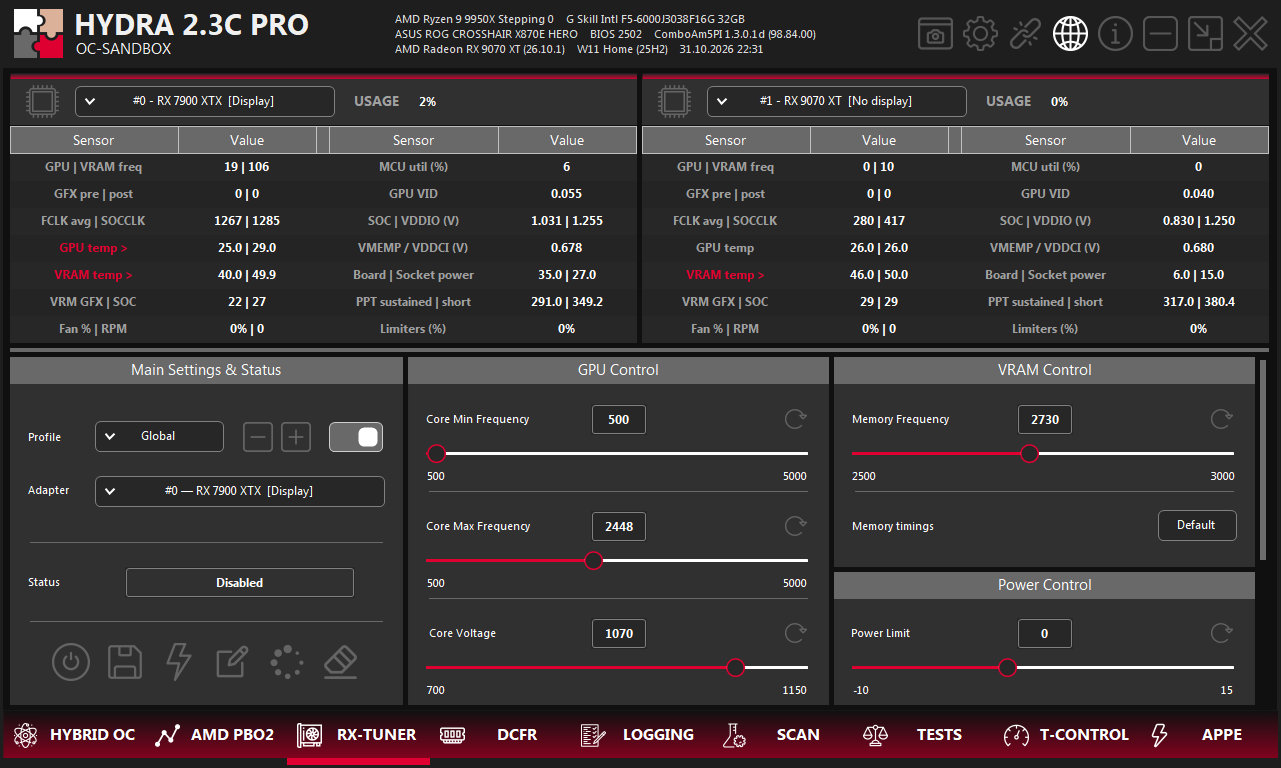
- 1RX-TUNER. The tab on the bottom bar of HYDRA.
- 2Sensors. Live clocks, voltages, temperatures, power and limiters of up to two cards; pick the card in each list. A red name opens a telemetry window.
- 3Profile. The profile you edit, the buttons to add or delete one, and the switch that enables it.
- 4Adapter. The card whose values you edit.
- 5Status. The profile in use now, or Disabled.
- 6Buttons. On/off, save, apply PowerPlay, back up, load backup, reset.
- 7GPU Control. Core clocks and core voltage.
- 8Reset. The round arrow next to a setting returns it to the card's default.
- 9VRAM Control. Memory clock and timings.
- 10Memory timings. Default or Fast.
- 11Power Control. Power limit.
- 12Scroll. Scroll the panel down to reach Fan Control and Advanced Control.
Profiles
- Global is the base profile. It works for every app and cannot be switched off.
- + creates a profile for one app: pick the app, then the profile to copy its settings from. − deletes the selected one. The switch next to them enables a custom profile: while its app runs, it replaces Global.
- Adapter chooses the card. Every value on the tab belongs to the selected profile and card; profiles stay bound to the physical card.
- Edits are kept in memory at once. Save writes them to disk, so they are still there after HYDRA restarts.
Turn RX-TUNER on
The power button turns RX-TUNER on: HYDRA applies Global and switches to an enabled app profile whenever its app runs. Status shows the profile in use.
| Button | What it does |
|---|---|
| On/off | On applies the profiles. Off returns the card to stock. |
| Save | Saves all Radeon profiles to disk. |
| Apply PowerPlay | RX 6000 only. Writes the table edited in SOFT PP EDITOR and offers to restart the driver, which takes about 20 seconds; the table takes effect after the restart. If RX-TUNER was on, HYDRA turns it back on afterwards. |
| Back up | Saves all Radeon profiles to a file you choose. |
| Load backup | Imports a profile file. HYDRA checks that it matches your cards and turns RX-TUNER off; press Save to keep the loaded profiles. |
| Reset | After confirmation, deletes all profiles and returns the cards to stock. On RX 6000 it also returns the PowerPlay table to factory and offers a driver restart. |
GPU Control
| Setting | What it does |
|---|---|
| Core Min Frequency (MHz) | The lowest core clock the driver may use. HYDRA keeps it at least 100 MHz below the maximum and raises the maximum if needed. Not available on RX 9000. |
| Core Max Frequency (MHz) | The highest core clock the driver may request. It is a ceiling, not a guaranteed clock: voltage, temperature and power still decide the real clock. |
| Core Voltage (mV) | The core voltage target. Too low causes driver resets or crashes; too high adds heat. On RX 7000 and 9000 a voltage curve from RADEON ADVANCED CONTROL replaces it. |
On RX 9000 the driver takes offsets instead, so the names read Core Max Frequency Offset and Core Voltage Offset. The range of every slider comes from the card.
VRAM and power
| Setting | What it does |
|---|---|
| Memory Frequency (MHz) | Memory clock. Too high causes artifacts, driver resets or a silent loss of performance from memory errors; check it with VANTA. |
| Memory timings | Default or Fast. Fast tightens the memory timings: it can be faster, but it can fail at a memory clock that was stable with Default. |
| Power Limit (%) | Power limit offset from stock, in the range the card allows. A higher value helps only when power is what limits the clock; a lower one saves power and noise. |
Fan Control
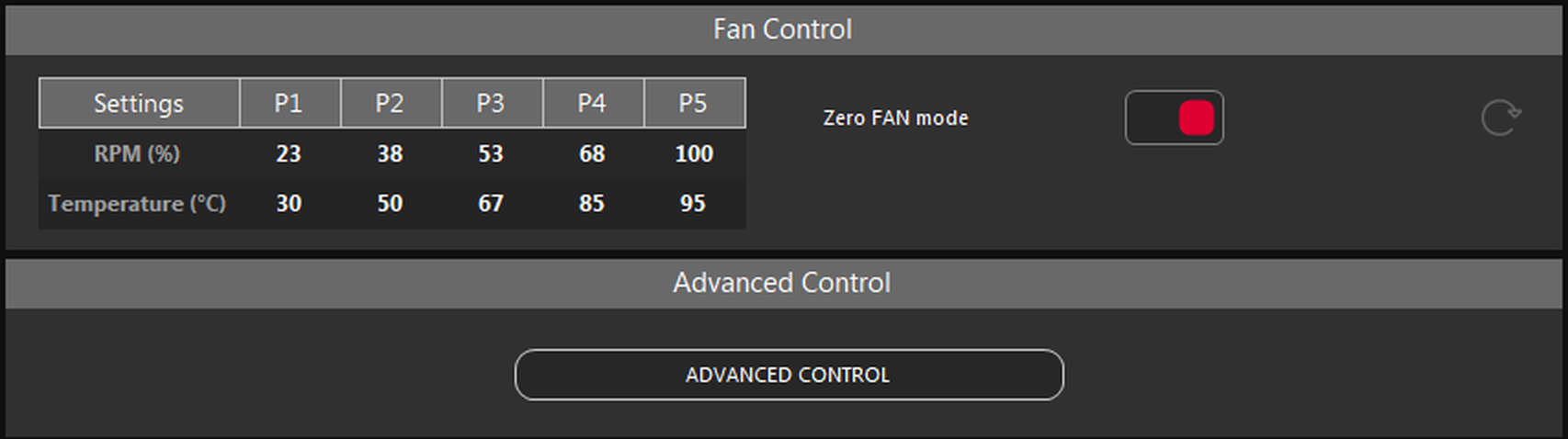
- 1Fan curve. Five points: fan speed in % and temperature in °C.
- 2Zero FAN mode. Lets the fans stop while the card is cool; they start again as it warms up.
- 3Reset. Returns the factory fan curve and turns Zero FAN mode on.
- 4ADVANCED CONTROL. Opens RADEON ADVANCED CONTROL. On RX 6000 the button reads SOFT PP EDITOR.
- Values outside what the card allows are set to its nearest limit.
- Neighbouring points follow the one you edit: speed and temperature never go down along the curve.
Something wrong or missing on this page? Tell us in Discord.