
NVIDIA TENSOR UNLOCK
What it is. A one-time procedure for desktop GeForce RTX 4000 (Ada) cards that removes the GeForce half-rate limit on tensor-core math with FP32 accumulation, with FP16, BF16 or FP8 inputs. It runs from a USB flash drive before Windows starts; HYDRA prepares the drive and restarts the PC for you.
Why use it. These operations then run at full speed, twice the stock rate. That speeds up work that relies on this math, such as training and running AI models in mixed precision.
What it unlocks
A tensor-core operation multiplies matrices in one format and adds the results up (accumulates) in the same or a wider one. On a stock GeForce RTX 4000, accumulating in FP32 runs at half the speed of accumulating in FP16. Tensor Unlock lifts that limit:
| Inputs | Accumulation | Stock GeForce | After Tensor Unlock |
|---|---|---|---|
| FP16 | FP16 | Full rate | Full rate (unchanged) |
| FP16 | FP32 | Half rate | Full rate |
| BF16 | FP32 | Half rate | Full rate |
| FP8 (E4M3, E5M2) | FP32 | Half rate | Full rate |
It matters for work that runs tensor-core math with FP32 accumulation, such as AI training and inference in mixed precision. On an unlocked RTX 4080, FP16 and BF16 with FP32 accumulation reach about 212 TFLOP/s, the same as FP16 with FP16 accumulation, and FP8 with FP32 accumulation reaches about 424 TFLOP/s.
Before you start
- A desktop GeForce RTX 4000 card. RTX 5000 cards are not supported.
- Secure Boot off in BIOS/UEFI. The unlock program is not signed and cannot run with Secure Boot on.
- BitLocker suspended on the system drive. Otherwise Windows stops at the recovery key screen after the unlock boot, and HYDRA does not start Tensor Unlock while protection is on. In a terminal opened as administrator:
A plain suspension withoutmanage-bde -protectors -disable C: -RebootCount 0-RebootCount 0ends on the very next Windows start, which is the unlock boot. Turn protection back on only after a later normal Windows start:manage-bde -protectors -enable C: - A USB flash drive formatted as FAT32 (GPT or MBR). HYDRA does not format it: it adds or replaces only its own package files and backs up replaced files on the PC. Keep your own copy of important files on the drive anyway. Internal disks are not offered.
- Save your work. Windows restarts 60 seconds after the drive is ready and closes the remaining applications.
Run it
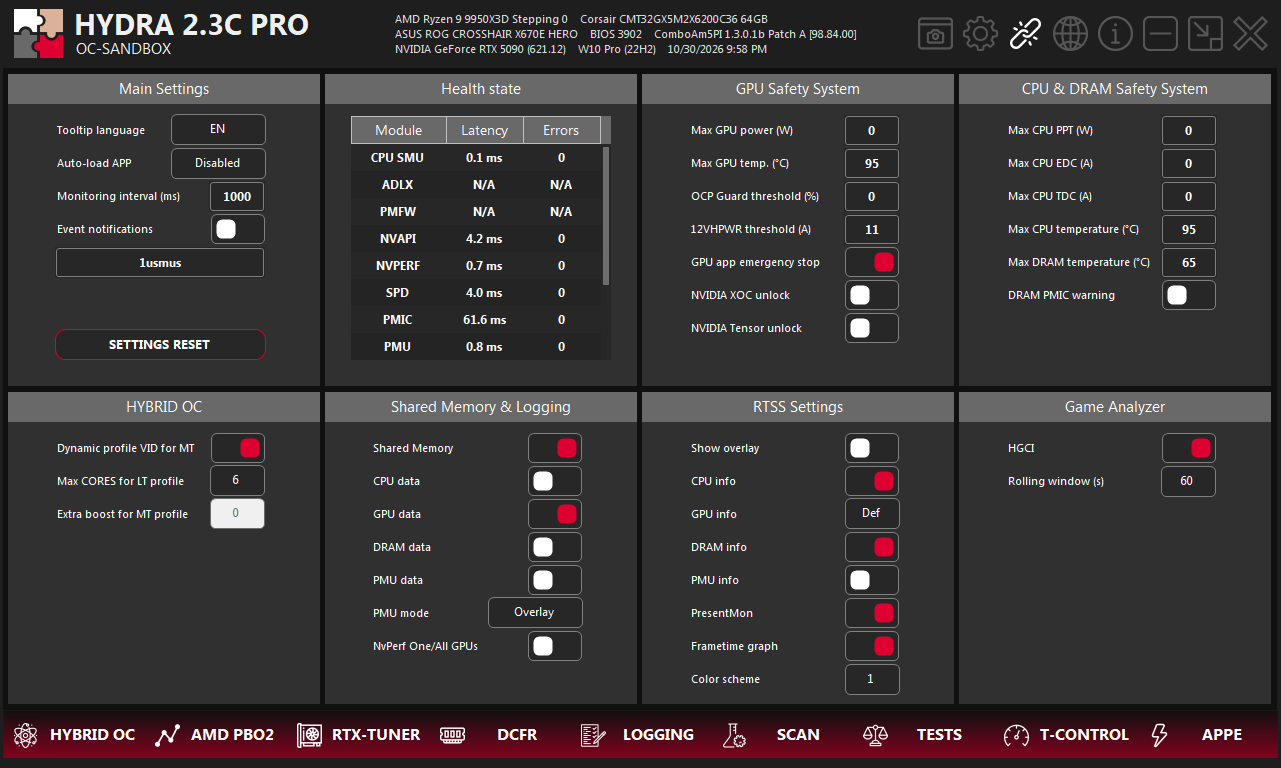
- 1SETTINGS. The gear icon in the top-right corner of HYDRA opens this tab.
- 2NVIDIA Tensor unlock. The switch in the GPU Safety System panel.
- Switch NVIDIA Tensor unlock on.
- If the PC has more than one RTX 4000, choose the current card or all of them. The cards are processed one at a time.
- Choose the FAT32 USB drive. HYDRA copies the package to it.
- HYDRA schedules a one-time boot from the drive, asks Windows to restart in 60 seconds and closes. Your normal boot order is not changed.
- The PC boots from the drive, unlocks the selected cards and starts Windows. If something fails, the error goes to the report and the computer shuts down.
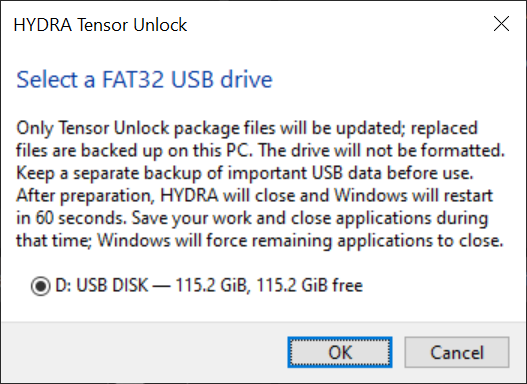
- 1Drive. Only FAT32 USB drives are listed, with their size and free space.
- 2OK. HYDRA copies the package. When it is ready, HYDRA closes and Windows restarts in 60 seconds.
After the restart
- The switch is not saved. At every start HYDRA reads the state of each RTX 4000; when all of them are already unlocked, the switch shows on and is locked.
- The report is on the USB drive in
HYDRA-Tensor-Unlock\Logs\RUN<number>\REPORT.TXT. Every run gets a new folder, so older reports are kept. - The boot from the drive happens once. The next restart starts Windows as usual, even with the drive still connected.
- If you suspended BitLocker, turn it back on after a normal Windows start.
Check the result
The USB drive also gets HYDRA-Tensor-Unlock\TensorCheck.exe. It measures the tensor-core rate of each format for about 20 seconds and compares FP32 accumulation with FP16 accumulation. It changes nothing on the card. Close other GPU work before you run it; with several cards, choose one with --pci.
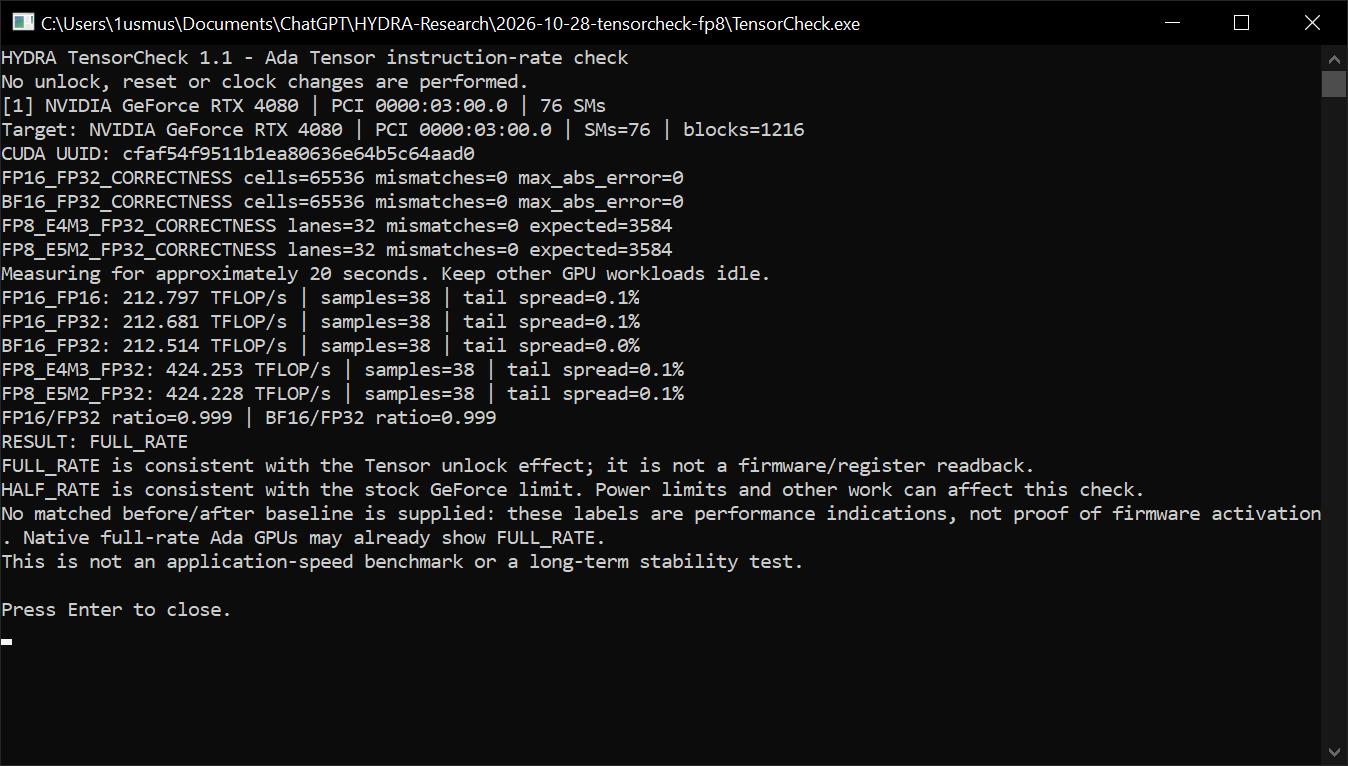
- 1Card. The GPU that was measured.
- 2Rates. TFLOP/s for each format. After the unlock, FP16 and BF16 with FP32 accumulation match FP16 with FP16 accumulation.
- 3Result. The FP32-to-FP16 ratios and the verdict.
| RESULT | Ratio | Meaning |
|---|---|---|
| FULL_RATE | 0.85 – 1.15 | FP32 accumulation runs at full speed: consistent with an unlocked card. |
| HALF_RATE | 0.35 – 0.65 | Half speed: the stock GeForce limit. |
| INCONCLUSIVE | anything else | The measurement was unstable. Close other GPU work and run it again. |
If it does not start
HYDRA writes the reason to the LOGGING tab. Secure Boot and BitLocker get their own messages. Other problems use one line that names the step that failed:
NVIDIA Tensor Unlock operation unavailable: unit=T1, stage=S3, adapter=0, code=0x1001, … trace=…| Stage | Step |
|---|---|
| S1 | Platform check (Secure Boot, BitLocker) and choice of cards |
| S2 | Preparing the package |
| S3 | Copying the package to the USB drive |
| S4 | Creating the one-time boot entry |
| S5 | Requesting the restart |
| S6 | Cleaning up after a failed step |
Something wrong or missing on this page? Tell us in Discord.