
NVIDIA XOC UNLOCK
What it is. One switch in SETTINGS that widens the limits RTX-TUNER may use on supported cards: board power up to 150 %, the full video memory offset range and higher current limits. It stays on until you turn it off.
Why use it. When a card is held back by its power or current limit, the extra headroom lets it hold higher clocks under heavy load, and the memory unlock gives more room for memory overclocking. It is meant for overclocking with good cooling.
Turn it on
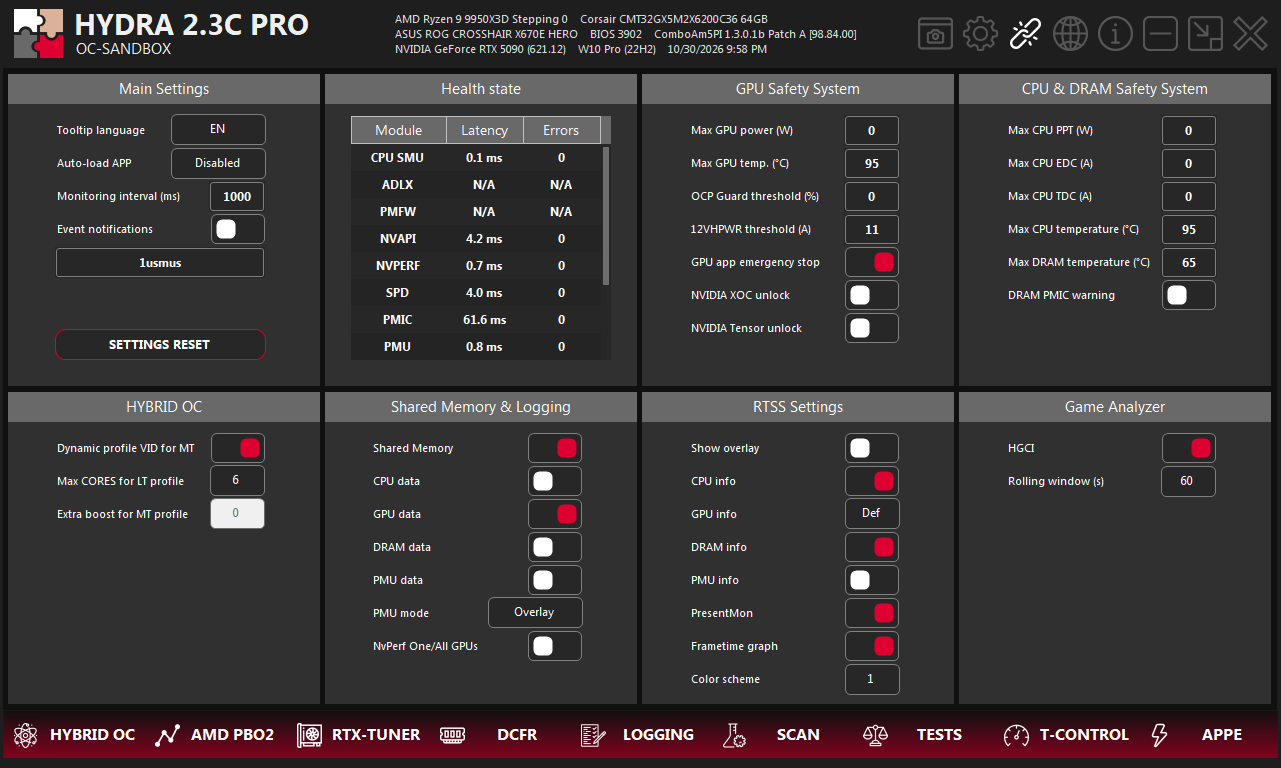
- 1SETTINGS. The gear icon in the top-right corner of HYDRA opens this tab.
- 2NVIDIA XOC unlock. The switch in the GPU Safety System panel.
Switch NVIDIA XOC unlock on. XOC starts with the 150 % preset and widens the ranges your card supports. Input current and OCP keep their initial values until a profile applies your own settings.
What it unlocks
| Setting | Where | With XOC |
|---|---|---|
| Power limit (%) | RTX-TUNER | Up to 150 % on desktop GeForce RTX 40, supported RTX 50 and RTX PRO 6000. If the stock driver maximum is higher, it stays available. |
| VRAM offset (MHz) | RTX-TUNER | The board's full memory offset range on RTX 50 and RTX PRO 6000. |
| NVVDD / MSVDD Lim (mV, A) | RTX-TUNER → Voltage & Current | Available only with XOC. The maximum follows the XOC tier; a higher current limit makes overcurrent protection trigger later. |
| Input current (A) | RTX-TUNER → Voltage & Current | The initial maximum is raised by 50 %. |
Voltage & Current Limits
The Voltage & Current button on RTX-TUNER opens this window. The values are absolute (mV or A) and belong to the selected profile; the round arrow next to each one returns it to stock. The ranges depend on the card and the XOC tier. Example from an RTX 5090 with XOC on:
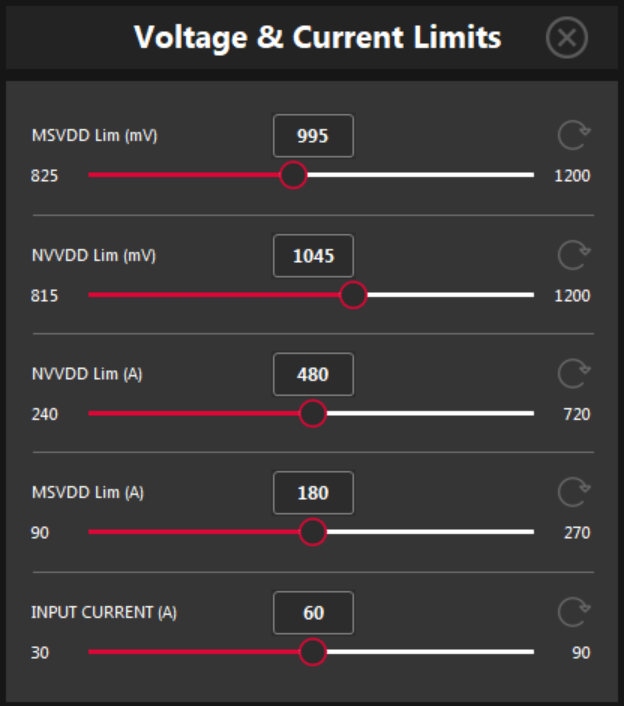
- 1Value. The limit for the selected profile, in mV or A. Type it or drag the slider.
- 2Range. The lowest and highest value this card allows at the current XOC tier.
- 3Reset. Returns this limit to stock.
- 4Close. Closes the window.
NVVDD Lim (mV) is the NVVDD Lim line in CURVE EDITOR: curve points above it are not used. The current limits (A) set where overcurrent protection steps in.
Check that it worked
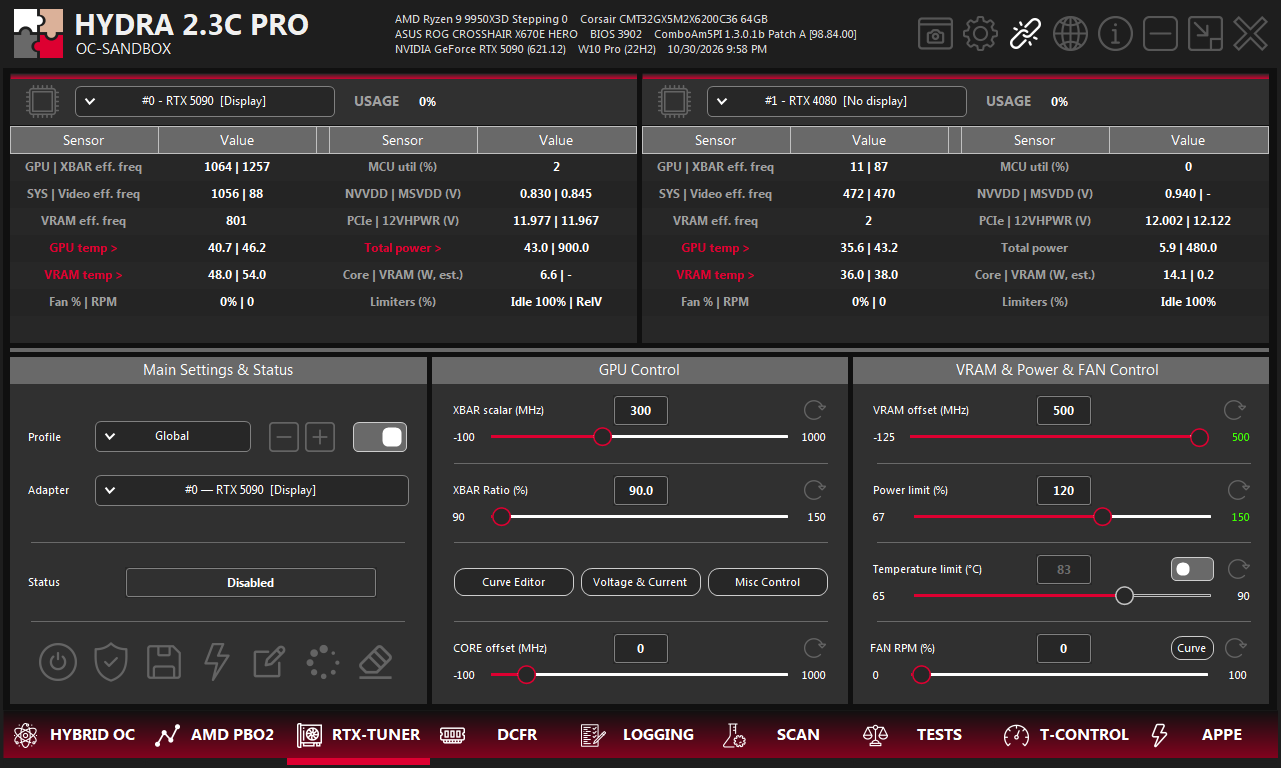
- 1RTX-TUNER. The tab where the unlocked ranges are used.
- 2Power limit maximum. 150 in green: the power unlock is ready.
- 3VRAM offset maximum. 500 in green: the memory unlock is ready.
- 4Voltage & Current. NVVDD / MSVDD limits and input current. Needs XOC.
The colour of the maximum value at the right end of a slider tells you the state of its unlock:
- Green — the unlocked range is ready.
- Red — XOC is on, but this unlock did not work. The LOGGING tab has a line that starts with
NVIDIA XOC operation unavailable:. - White — XOC is off, or the card has no unlock of this kind.
The unlock stays active even when RTX-TUNER profiles are switched off.
Turn it off
Switch NVIDIA XOC unlock off. HYDRA restarts the NVIDIA driver, so the screen flickers briefly. The driver restart button on the RTX-TUNER tab also sets XOC to Disabled and returns the driver to stock.
Something wrong or missing on this page? Tell us in Discord.