UPDATE
What it is. HYDRA's built-in updater. HYDRA checks for a new version by itself, shows what has changed, downloads the update, verifies it and installs it with a restart. Your settings, profiles, logs and results stay as they are.
Why use it. You do not have to follow releases or copy files by hand: a lit globe icon tells you that a new build is out, and one window takes you from the changelog to the updated HYDRA. The download is checked before anything is replaced, and a failed update returns to the previous version.
How HYDRA finds updates
- While HYDRA runs, it asks the update server about a new version once an hour, and right after you sign in. The check is quiet: no window opens.
- When a newer version is out, the globe icon in the top-right corner of HYDRA lights up.
- Click the globe icon to open HYDRA / UPDATE. The click also checks the server right away.
- Updates need an active Early Access subscription on Patreon or an authorization code. Without one, HYDRA shows a message instead of the window.
The HYDRA / UPDATE window
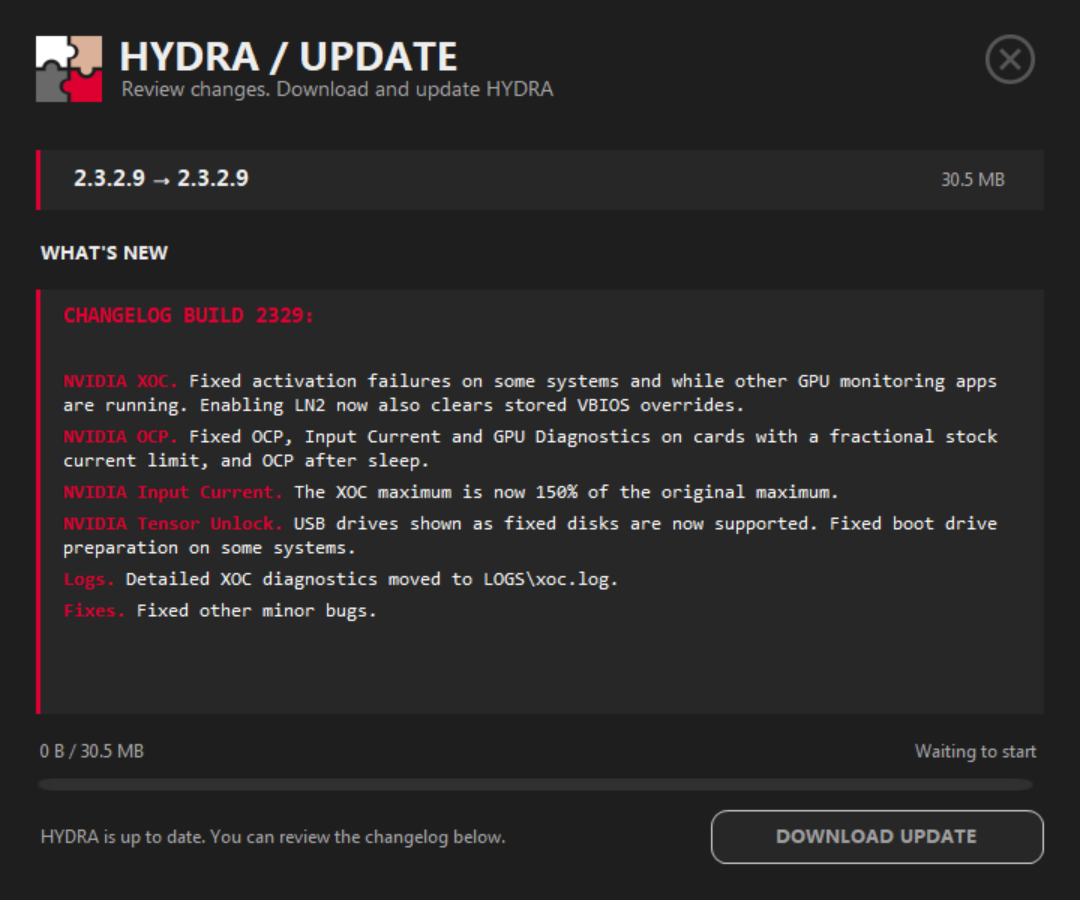
- 1Versions. Your version → the newest one. The same number on both sides means HYDRA is up to date.
- 2Size. How much the update archive weighs.
- 3WHAT'S NEW. The notes of every build released after your version, newest first, so nothing is lost when you skip a few builds. Up to date, it shows the notes of your build. Select text and press Ctrl+C to copy it.
- 4Progress. Downloaded and total size, the download speed, and then the result of the verification.
- 5Status. What the window is doing now, or why there is nothing to download.
- 6Main button. DOWNLOAD UPDATE, then PAUSE DOWNLOAD or RESUME DOWNLOAD, VERIFYING… and RESTART & UPDATE; RETRY DOWNLOAD after an error. Greyed out when there is nothing to download.
Installing an update
- Click the globe icon and read WHAT'S NEW.
- Click DOWNLOAD UPDATE. You can pause and resume the download; closing the window cancels it.
- When the download ends, HYDRA checks the archive: its SHA-256 hash and ES256 digital signature must match what the update server published. A damaged or altered archive is rejected.
- Click RESTART & UPDATE when you are ready. HYDRA closes, the updater replaces its files and starts HYDRA again.
| The update keeps | Where |
|---|---|
| Settings | The .ini files next to HYDRA.exe. |
| Profiles | CPU, GPU and T-CONTROL profiles with their backups. |
| Logs and results | The LOGS and RESULTS folders. |
Every file the update replaces is backed up first. If installing fails, the updater puts the previous files back and starts the old HYDRA; its log is in %LOCALAPPDATA%\HYDRA\Updater\Logs.
If the update does not work
| Message | What to do |
|---|---|
| HYDRA could not reach the update server | Check the VPN, the firewall and DNS, or try again later. |
| Download limit reached | Updates have a daily download limit. Try again later. |
| Update verification failed | The archive arrived damaged. Download it again. |
| A newer build is available | A new build came out while the window was open. Close it and click the globe icon again. |
| Protected updates require an active Early Access subscription | Check your subscription on Patreon or your authorization code. |
After a network error HYDRA retries the download a few times by itself before it shows RETRY DOWNLOAD.
Good to know
- The APP PACK packages, such as the benchmarks and y-cruncher, are updated separately, in the APP PACK window.
- When Microsoft Defender is active, the updater adds the HYDRA driver (
HYDRA.sys) to the exclusions of its attack surface reduction rules, so those rules do not block the driver.
Something wrong or missing on this page? Tell us in Discord.