
HGCI
What it is. The HYDRA Game Comfort Index: one score from 0 to 100 for how comfortable a game feels. It combines the evenness of frames, response time, how well the frames fit your display, performance headroom and whether the frame rate is high enough. HYDRA shows it live in the overlay and builds a full report from a recorded session.
Why use it. Average FPS hides stutter: two settings with the same FPS can feel very different. HGCI catches uneven frames and short freezes (hitches), tells you which part of the experience is weakest, and lets you compare settings, drivers or a new tuning with one number instead of guessing by eye.
Before you start
- In the SETTINGS tab, turn on PresentMon in the RTSS Settings panel and HGCI in the Game Analyzer panel. Ctrl+Alt+F7 turns HGCI on and off from a game. See RTSS.
- Rolling window sets how many recent seconds the live score uses, from 1 to 600. A short window reacts quickly to a new scene but jumps more; a long one is steadier but slower to show a change.
- HGCI needs at least 20 seconds and 300 frames of a game before the first score. Until then the overlay shows Warm-up.
In the overlay
With HGCI on, the Game Analyzer block appears at the bottom of the HYDRA overlay. It describes the last Rolling window seconds and updates with the overlay.
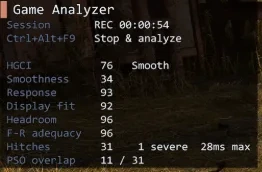
| Line | Meaning |
|---|---|
| Session | READY, or REC with the elapsed time while a session is recorded. The line under it says what Ctrl+Alt+F9 does now: Start capture or Stop & analyze. |
| HGCI | The overall score and its level, see Score levels. Warm-up, No frames or No display frames instead of a number mean there is no score yet, for example while the game is paused or minimized. |
| Smoothness … F-R adequacy | The five parts of the score, 0 to 100 each, see What the score is made of. |
| Hitches | Hitches in the Rolling window: their number, how many of them are severe, and the longest frame. See What counts as a hitch. |
| PSO overlap | How many of these hitches coincide with shader (PSO) compilation in the game. -- with no hitches, N/A when the game gives no PSO data. |
How the score works
What the score is made of
HGCI is a weighted sum of five parts. Each starts at 100 and loses points for what spoils the experience.
| Part | Weight | What lowers it |
|---|---|---|
| Smoothness | 30 % | Uneven frame times: the slowest 5 % and 1 % of frames compared with a typical frame, jitter from frame to frame, and mistimed animation. |
| Response | 20 % | Latency from input, or from the frame start on the CPU, to the screen. 20 ms or less scores 100, 60 ms scores 50. |
| Display fit | 20 % | Frames that do not fit the display: with V-Sync, a frame rate far below the refresh rate or stuck near a half, third or quarter of it; VRR that is on but not active or out of its range; frames running into the refresh-rate cap; too few frames for the refresh rate; tearing. |
| Headroom | 10 % | A long tail of slow frames, frames pressed against the refresh-rate cap, and a GPU that is busy for more than about 80 % of each frame. |
| F-R adequacy | 20 % | A low frame rate on the screen: 30 FPS scores 20, 60 FPS 68, 90 FPS 88, 120 FPS 96, 144 FPS and more 100. |
Score levels
| Level | HGCI |
|---|---|
| Esports | 90 and more, with Smoothness at least 90, Response and F-R adequacy at 100, and a frame rate not below the VRR minimum (or 90 % of the refresh rate without VRR). |
| Smooth | 75 and more, when the Esports conditions are not met. |
| Playable | 60 to 74. |
| Compromise | 40 to 59. |
| Uncomfortable | Below 40. |
The level changes only when the score moves 2 points past a boundary, so it does not flicker between two levels.
What counts as a hitch
A hitch is a short freeze that average FPS hides. HYDRA counts it from the frames that reach the screen:
- A frame is slow when it takes at least 1.5 times the typical frame time and at least 8 ms longer. The typical frame time is the median of the last 63 frames, so it follows the game when the frame rate changes.
- Slow frames in a row are one hitch. It ends after 3 normal frames.
- A hitch is severe when its longest frame takes 50 ms or more, or 3 times the typical frame time, or when its slow frames together lose 25 ms or more.
Session report
A session records the whole game run to a file and turns it into a report.
- In the game, press Ctrl+Alt+F9. Session in the overlay changes to REC. Recording needs PresentMon and HGCI on and frames from the game.
- Play the part you want to evaluate.
- Press Ctrl+Alt+F9 again. HYDRA stops the recording, analyzes it and opens the report.
Sessions are saved in the LOGS\HGCI folder next to HYDRA. HGCI HISTORY in the TESTS tab opens the report of the latest session.
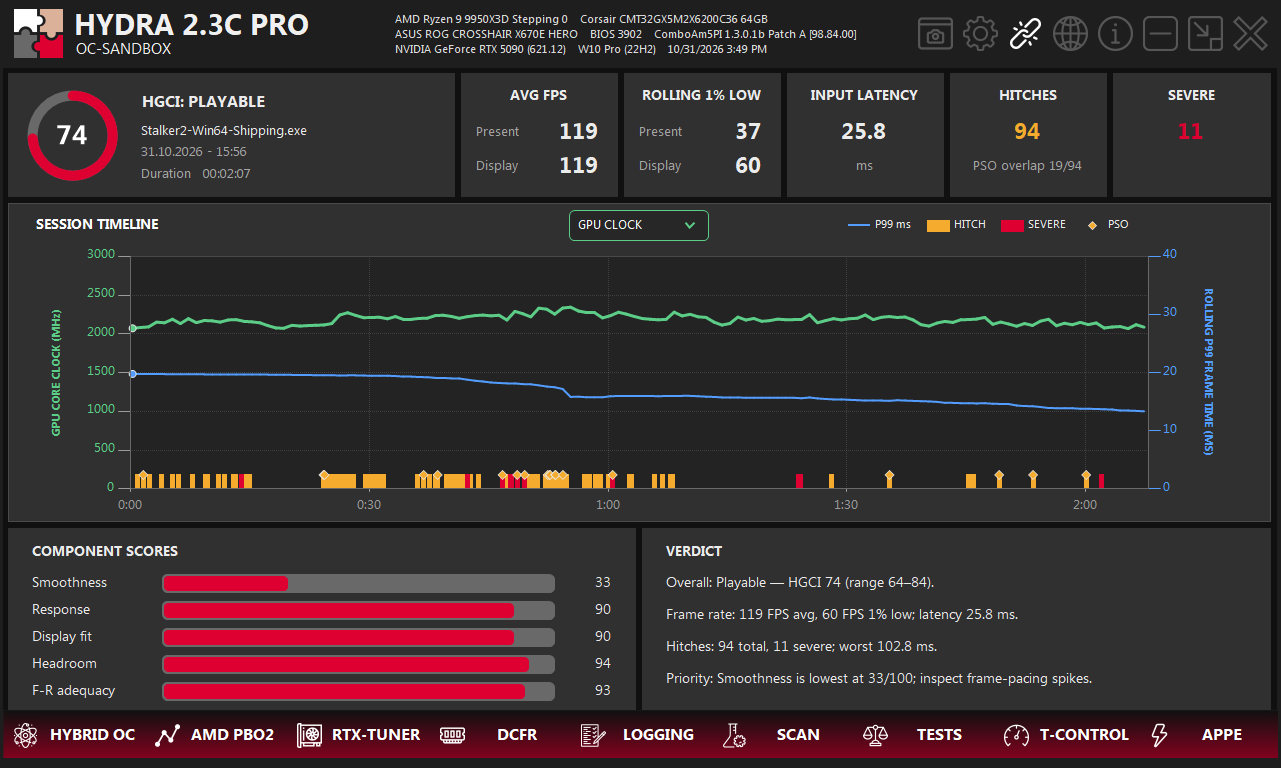
- 1Score. The average HGCI of the session, the level shown most of the time, the game, the start time and the length.
- 2AVG FPS. Average frame rate for Present (App when every frame comes from the game) and Display.
- 3ROLLING 1% LOW. The mean of the rolling 1 % low values over the session, not the 1 % low of the whole session.
- 4INPUT LATENCY. Mean time from input to the screen. Without input events the card shows CPU → DISPLAY, the time from the frame start on the CPU to the screen. Software timestamps, not an optical measurement.
- 5HITCHES. All hitches of the session, with the PSO overlap under them.
- 6SEVERE. How many of these hitches are severe.
- 7Timeline metric. The main line of the timeline: GPU CLOCK or HGCI.
- 8SESSION TIMELINE. Rolling P99 frame time (blue, right axis), hitches (orange), severe hitches (red) and PSO overlap (diamonds). Hover a hitch for its details; drag to zoom, double-click to reset.
- 9COMPONENT SCORES. Session averages of the five parts.
- 10VERDICT. The level with the average and range of HGCI, frame rate and latency, hitches with the worst one, and the weakest part with a hint on what to check.
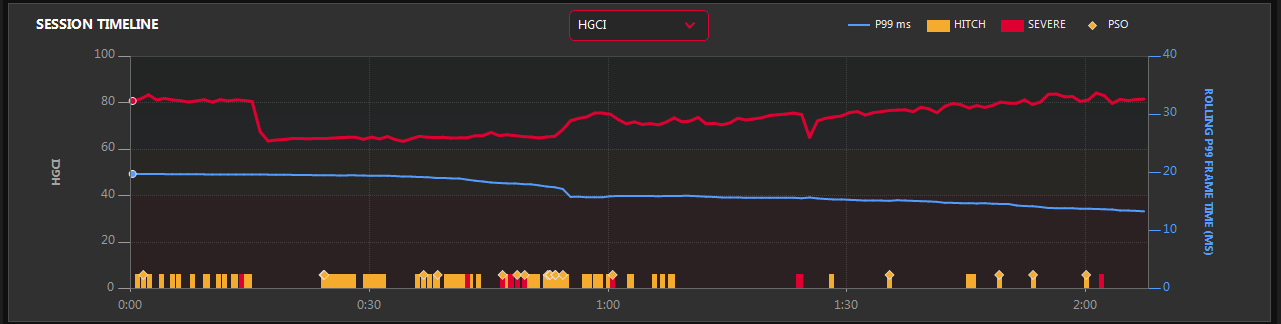
A hitch tooltip shows when it happened, its worst frame, the typical frame time, the number of slow frames, the PSO result, and the nearest GPU clock and load, with power and temperature when the card reports them. A shaded area at the start of the timeline is the warm-up before the first score; hitches are counted from 0:00.
Good to know
- Compare like with like: the same scene, a similar session length and the same Rolling window.
- With frame generation, Present can be far above Display. HGCI rates Display, the frames you actually see.
- High FPS with low Smoothness means uneven frames. Look at the timeline to see when the hitches happen and whether PSO overlap points to shader compilation.
Something wrong or missing on this page? Tell us in Discord.