
DATA EYE
What it is. A look at how much safety margin your memory signals have. HYDRA restarts the PC, and then it restarts five more times by itself. After each of these five restarts the memory trains from scratch, and the memory test built into AMD processors (MBIST Data Eye) measures how far each signal can drift in time and in voltage before errors appear. The five trainings are saved as one series, and two series can be compared side by side.
Why use it. Signal settings such as ProcODT, RTT and drive strength are usually chosen by guesswork and hours of stress tests. DATA EYE shows in one run whether a change made the margins wider or narrower, and where: in reading or writing, in timing or in voltage. Wider margins leave more room for heat, noise and higher data rates. DATA EYE has no analogues: no other tool lets you start this measurement from Windows and compare two settings rank by rank.
What the data eye is
Every bit between the processor and the memory is a short voltage pulse. Lay millions of them on top of each other and you get the picture below: the lines cross where one bit ends and the next begins, and leave an opening in the middle, the eye. To read a bit without an error, the receiver must sample it inside that opening: at the right moment and against the right threshold voltage, called Vref.
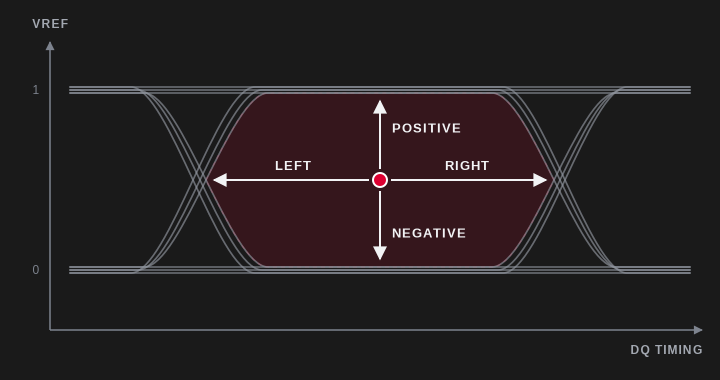
A wide eye tolerates noise, heat and small drifts; a narrow one fails first. Termination and drive strength settings change the shape of the eye. DATA EYE measures it in both directions: READ, when the memory sends data and the processor receives it, and WRITE, when the processor sends and the memory receives.
The voltage margin is about that threshold, Vref, not about the supply. It does not tell you how far VDD, VDDQ or CPU VDDIO can be lowered.
Run DATA EYE
The DATA EYE tile is in the DRAM section of the TESTS tab: RUN records a new series, HISTORY opens the saved ones. Before the restart, HYDRA checks the system and lists anything that stops the run. Prepare these once:
| Setting | Why and how |
|---|---|
| Secure Boot: off | The helper that HYDRA starts during the restart is not signed by Microsoft. Turn Secure Boot off in BIOS; HYDRA never changes it itself. |
| BitLocker: suspended | Otherwise Windows asks for the recovery key after the run. Suspend protection without automatic resume, with the commands below the table. The same applies to device encryption. |
| AMD Variable Protection: disabled | Otherwise the BIOS rejects the temporary training options after the restart. HYDRA names the BIOS menu for your motherboard. |
| Password Protection of Runtime Variables: disabled | For the same reason. On ASUS it is under Advanced → UEFI Variable Protection. |
| Windows in UEFI mode | Legacy (CSM) boot is not supported. |
BitLocker, before the run: in a terminal opened as administrator, suspend protection until you resume it. Do this before you turn Secure Boot off, because that change alone can make Windows ask for the recovery key.
manage-bde -protectors -disable C: -RebootCount 0BitLocker, after the run: resume protection only when DATA EYE has finished and Windows has restarted normally at least once more.
manage-bde -protectors -enable C:- Click RUN. If a check fails, HYDRA lists what to fix and changes nothing.
- HYDRA shows the plan of the run. Click OK to restart, or Cancel to leave everything as it is.
- HYDRA closes properly, and Windows restarts in 10 seconds.
- The PC restarts five more times by itself. Each time the memory trains from scratch and the test measures the margins; each start can take several minutes.
- Windows starts. Sign in: HYDRA starts by itself, checks the five captures and opens TESTS → DATA EYE with the new series. If something went wrong, it opens LOGGING with the reason.
The screen at a glance
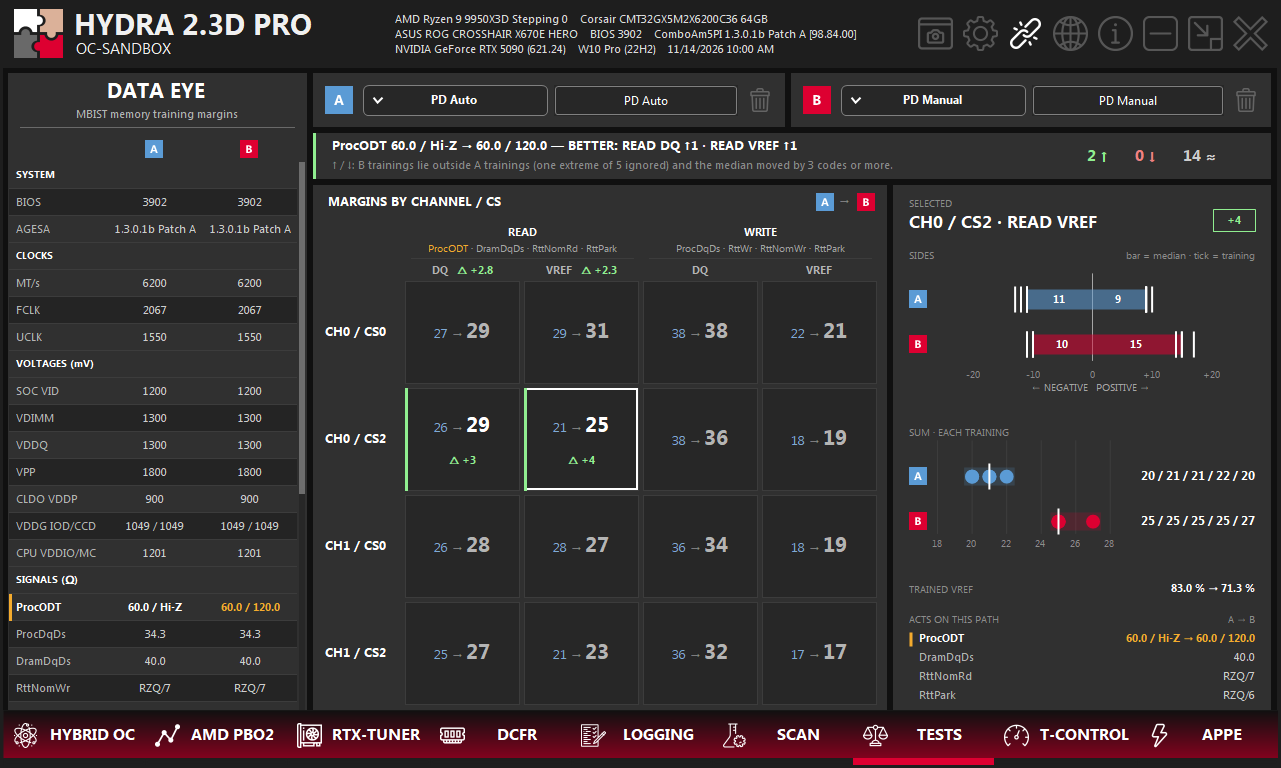
- 1TESTS. The tab on the bottom bar of HYDRA; the DATA EYE tile is in its DRAM section.
- 2Series A. Choose a saved series, give it your own name (Enter saves it, an empty field returns to the date) or delete it with the bin.
- 3Series B. Any other series. The page shows how B differs from A.
- 4Settings. BIOS, clocks, voltages, signal settings and BIOS Vref offsets of A and B. Changed values are amber; — means not recorded.
- 5Verdict. What changed from A to B and the result. On the right: how many cells got wider ↑, narrower ↓ or stayed the same ≈.
- 6MARGINS BY CHANNEL / CS. One row per memory rank, one column per direction: READ DQ, READ VREF, WRITE DQ, WRITE VREF.
- 7Path. The settings that act on reading or on writing. The changed one is amber.
- 8All ranks. The shift of the whole column, with △ or ▽ when it is beyond the scatter.
- 9Changed cell. A coloured stripe and △ +3: here B is wider than A beyond the normal scatter.
- 10Cell details. Both sides of the selected cell and each training. See Cell details.
When the page opens, B is your newest series and A the closest series at the same data rate. Click any cell to see its details.
Read the matrix
Each cell is the margin of one rank in one direction: the width of the eye, both sides added together, as the median of the five trainings. The small number is A, the big one is B. A larger number is a wider eye.
- Rows. CH is the memory channel, CS the rank (chip select). Four single-rank modules give four rows, as in the screenshot.
- Columns. DQ is the timing margin, VREF the voltage margin. READ is data from the memory to the processor, WRITE from the processor to the memory.
- Stripe with △ or ▽. B is wider (green) or narrower (red) than A: the B trainings lie outside the A trainings, ignoring one extreme of five, and the median moved by 3 codes or more. A shift of 1–2 codes is normal scatter between trainings and is not marked.
- △ or ▽ next to DQ or VREF. The whole column: the average of all ranks moved by more than 1.5 codes and B lies outside A. It catches a small shift that all ranks share but no single cell can prove. The verdict at the top counts cells only, so NO DIFFERENCE and △ next to a column can appear together.
- zero side. A side of 0 can mean that there is no value, so such a cell is not compared.
- White frame. The selected cell.
| Verdict | Meaning |
|---|---|
| BETTER | At least one cell got wider and none got narrower. |
| WORSE | At least one cell got narrower and none got wider. |
| TRADE-OFF | Some cells got wider, others narrower. |
| NO DIFFERENCE | The settings differ, but no cell moved beyond the scatter of 1–2 codes. |
| REPEAT | A and B have the same settings: a check of how well the results repeat. |
The second line of the verdict says how far to trust the result. Amber: several settings changed at once, so the result cannot be tied to one of them. Green: you measured A again after B, and B still differs in the same direction.
Which settings act on READ and WRITE
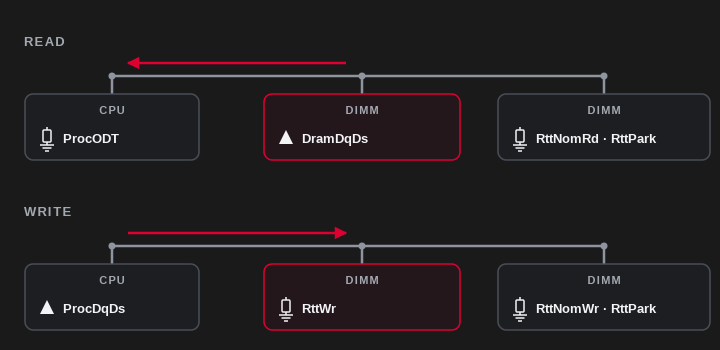
In READ the module drives the line with DramDqDs, and the processor absorbs the signal with ProcODT; the other module or rank on the channel terminates it with RttNomRd or RttPark. In WRITE the roles swap: the processor drives with ProcDqDs, the module terminates with RttWr, the other one with RttNomWr or RttPark.
That is why the Path line above READ and WRITE names different settings, and why a change of ProcODT can only move the READ columns.
Cell details
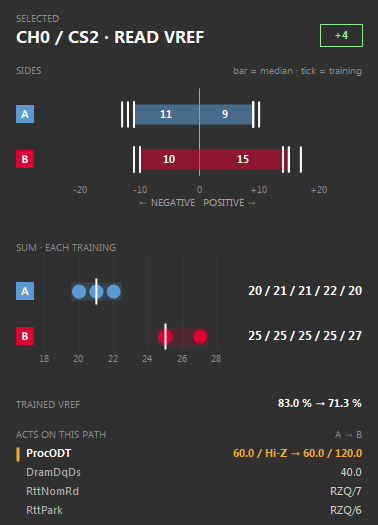
- 1Cell and shift. The selected rank and direction, and how far the median moved from A to B, in codes.
- 2SIDES. Each bar is the median of one series, measured from the trained point at 0: the left part is the NEGATIVE or LEFT side, the right part the POSITIVE or RIGHT side. Each white tick is one training.
- 3SUM · EACH TRAINING. Both sides added together in each training: one dot per training, the white line is the median, and the numbers on the right list them in order. When the B dots sit apart from the A dots, the change is not chance.
- 4TRAINED VREF. VREF cells only: where training set the threshold voltage, in % of the supply. For WRITE it is the memory's, for READ the processor's (Ryzen 9000 only, approximate level). A → B appears when it moved by 0.5 % or more.
- 5ACTS ON THIS PATH. The settings that act on this direction, A → B. The changed one is amber.
A hatched side marked ≥
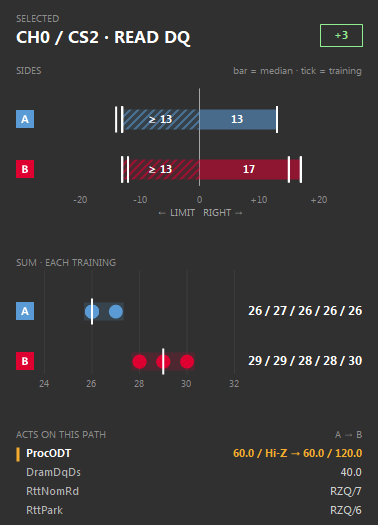
On READ DQ the left side is often hatched and marked ≥, with ← LIMIT under the axis. That side is not an edge of the eye: the delay that sets the read moment reached the end of its range before errors appeared. The real margin is at least that value, so this side cannot show an improvement, and the sum of the cell is a lower bound too.
The end of that range depends on where training put the read moment, so it can move by a code between trainings. Here the right side grew from 13 to 17 codes, while the left limit fell to 12 in two of the five B trainings. The cell adds both sides in each training and takes the median of the five sums: 26 for A, 29 for B. So it shows +3, not +4. The bars show the median of each side separately, so their numbers do not have to add up to the cell.
Example: ProcODT pull-down
ProcODT is the termination inside the processor. It absorbs reflections of the signal that comes from the memory, so it acts on reading only. It has two halves, pull-up and pull-down; Hi-Z means that half is off. In both comparisons A is 60.0 / Hi-Z, with the pull-down off, on four DDR5-6200 modules. In each B series the pull-down was turned on in BIOS, and nothing else changed.
Pull-down 120 Ω: BETTER
This is the comparison in the screenshot above: ProcODT 60.0 / Hi-Z → 60.0 / 120.0. Two cells got wider: READ DQ +3 and READ VREF +4 on CH0 / CS2. The whole READ column moved too: DQ +2.8 and VREF +2.3. All WRITE cells stayed within the scatter, as expected, because ProcODT is not on the write path. TRAINED VREF shows that training moved the processor's read threshold from 83.0 % to 71.3 % to fit the new termination.
Pull-down 60 Ω: TRADE-OFF
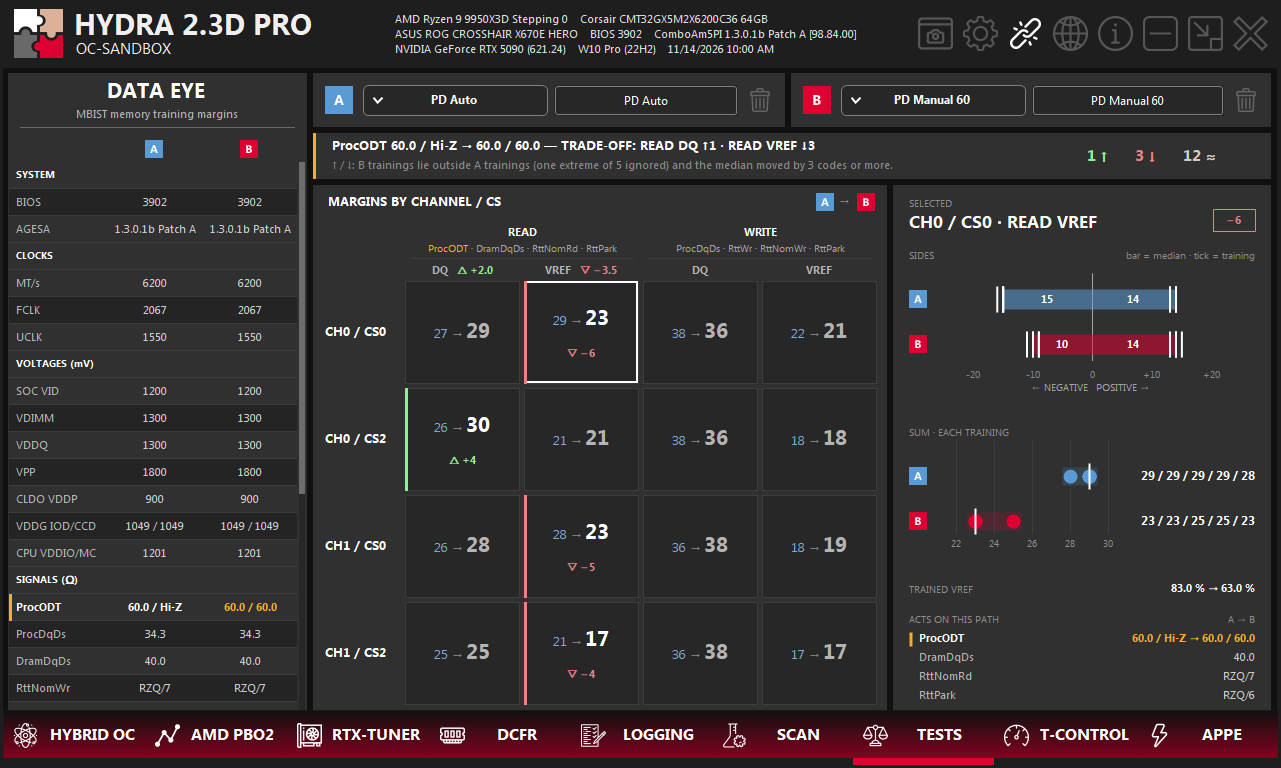
- 1ProcODT. The only changed setting: 60.0 / Hi-Z → 60.0 / 60.0.
- 2Verdict. TRADE-OFF: one cell wider in READ DQ, three narrower in READ VREF.
- 3All ranks. READ DQ +2.0, but READ VREF −3.5 for the whole column.
- 4READ VREF. Red stripes: three ranks lost 4–6 codes of voltage margin.
- 5READ DQ. CH0 / CS2 gained 4 codes of timing margin.
- 6SUM · EACH TRAINING. All five B trainings lie to the left of all five A trainings: the loss is not chance.
- 7TRAINED VREF. The read threshold moved even lower, to 63.0 %.
- 8WRITE. Unchanged again: ProcODT does not act on writing.
Good to know
- General rules for comparing two runs, A and B, are on the TESTS page.
- Compare series at the same data rate. At another rate a code is a different step, and HYDRA does not compare such series.
- If you doubt a result, for example because the trainings of a series lie far apart, record A once more after B. HYDRA then opens the last two series, which show the change backwards: choose the first A in list A and B in list B instead. HYDRA finds the repeat in the history, and the second line of the verdict turns green when B still differs in the same direction.
- To see how much the results drift by themselves, record the same settings twice: the verdict REPEAT should mark few cells or none.
- DATA EYE measures the margins while the memory trains at start-up, not under load in Windows. It does not replace a stability test: check your final settings with ANVIL.
- For READ, TRAINED VREF is a share of CPU VDDIO. If CPU VDDIO differs between A and B, the % shift does not show how the threshold itself moved.
- The bin removes a series from the list only; the raw captures stay in
C:\ProgramData\HYDRA\MemoryTraining. The series are saved inRESULTS\ResultsDataEye.jsonnext to HYDRA. - When you have finished, you can turn Secure Boot back on and resume BitLocker after a normal restart.
- Scripts can start DATA EYE through the control pipe (API/SDK):
benchmark.dataEye.getStatuschecks whether a run can start,benchmark.dataEye.startrestarts the PC.
Something wrong or missing on this page? Tell us in Discord.