
CHECK CONFLICTS
What it is. A 15-second check on the LOGGING tab that finds other apps using the same hardware buses as HYDRA: RGB, fan control, monitoring and other tuning software.
Why use it. When two programs talk to the same chip at once, sensor readings can be wrong and HYDRA works less stably. Close the apps the check finds before tuning or a diagnostic, and the results are more reliable.
Button LOGGING → conflict check
Takes 15 seconds
Updated 30 Oct 2026
Run the check
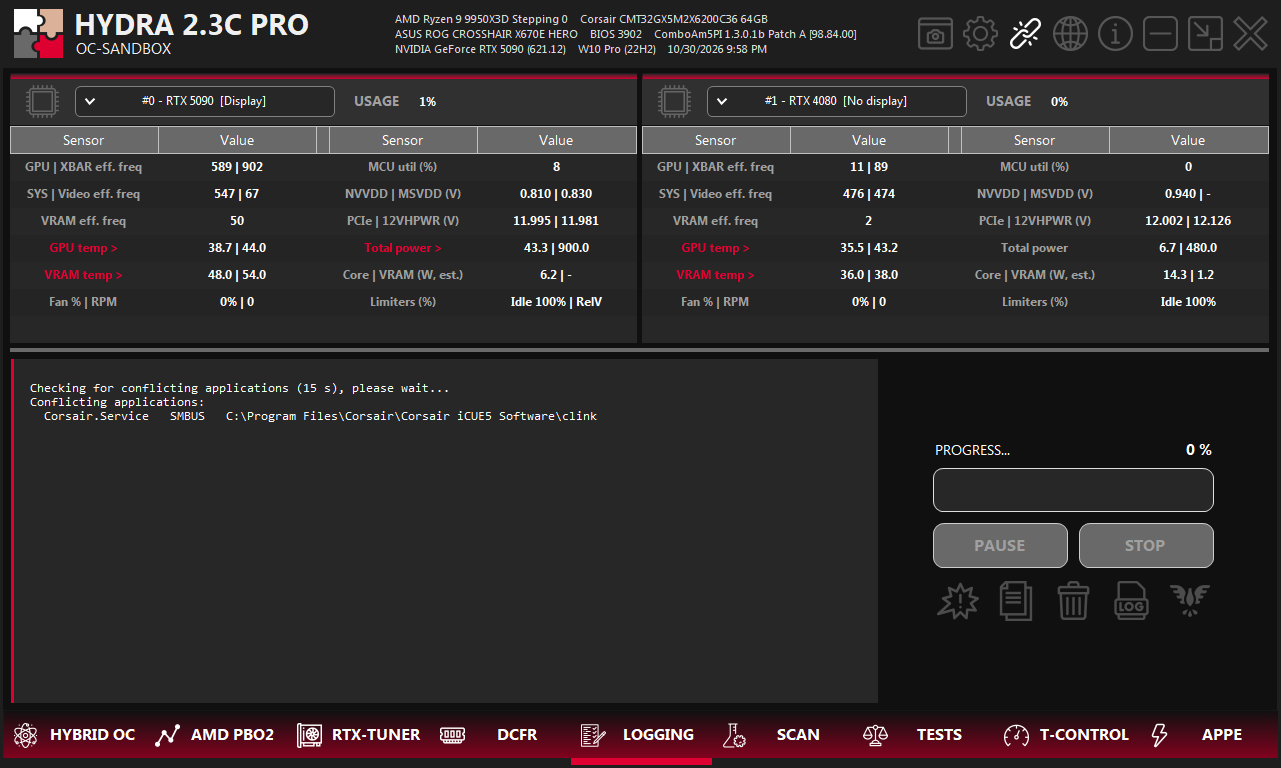
- 1LOGGING. The tab on the bottom bar of HYDRA.
- 2Conflict check. The first icon in the row under PAUSE and STOP.
- 3Report. The apps found, written to the log.
- 4Progress. The check watches the buses for 15 seconds.
Click the conflict check icon and wait 15 seconds. During that time HYDRA watches which processes hold or open the shared locks of the hardware buses. HYDRA also runs a quick check at start-up and writes to the log only if it finds something.
Read the report
Conflicting applications:
  Corsair.Service   SMBUS   C:\Program Files\Corsair\Corsair iCUE5 Software\clink
Each app gets one line with three columns:
| Column | What it shows |
|---|---|
| Name | The program file. Copies of the same file are merged into one line. A process whose file HYDRA cannot read is shown as PID and its number. |
| Buses | The buses it uses: PCI, ISABUS, SMBUS, EC, ATKACPI, ATI_SMC. held means the app was seen holding the lock, not only having it open. session N means the lock belongs to one Windows session. |
| Folder | Where the program lives, so you can find and close or remove it. |
NoteWhen the log says
No conflicting applications detected., nothing was found. When it says the check is inconclusive, Windows did not let HYDRA inspect some locks or sessions; run the check again.What to do
- Close the listed apps, or stop their services, before a SCAN, HYBRID OC or any tuning session.
- Typical examples are RGB and fan control software, hardware monitoring tools and other overclocking apps.
- Not every app on the list breaks HYDRA, but each one competes for the same buses. The fewer there are, the more stable HYDRA works.
- Run the check again after closing them.
Something wrong or missing on this page? Tell us in Discord.