
AMD PBO2
What it is. The tab where HYDRA sets AMD Precision Boost Overdrive from Windows: power and current limits, the temperature ceiling, Curve Optimizer for every core, Curve Shaper and the reference clocks. The values live in a HYDRA profile; the BIOS is not changed.
Why use it. Changes take effect without a reboot into BIOS, so you can try a value and see the result at once. A negative Curve Optimizer lowers core voltage, which can give higher boost clocks at the same power and temperature; higher limits let the CPU hold its boost longer under heavy load.
The screen at a glance
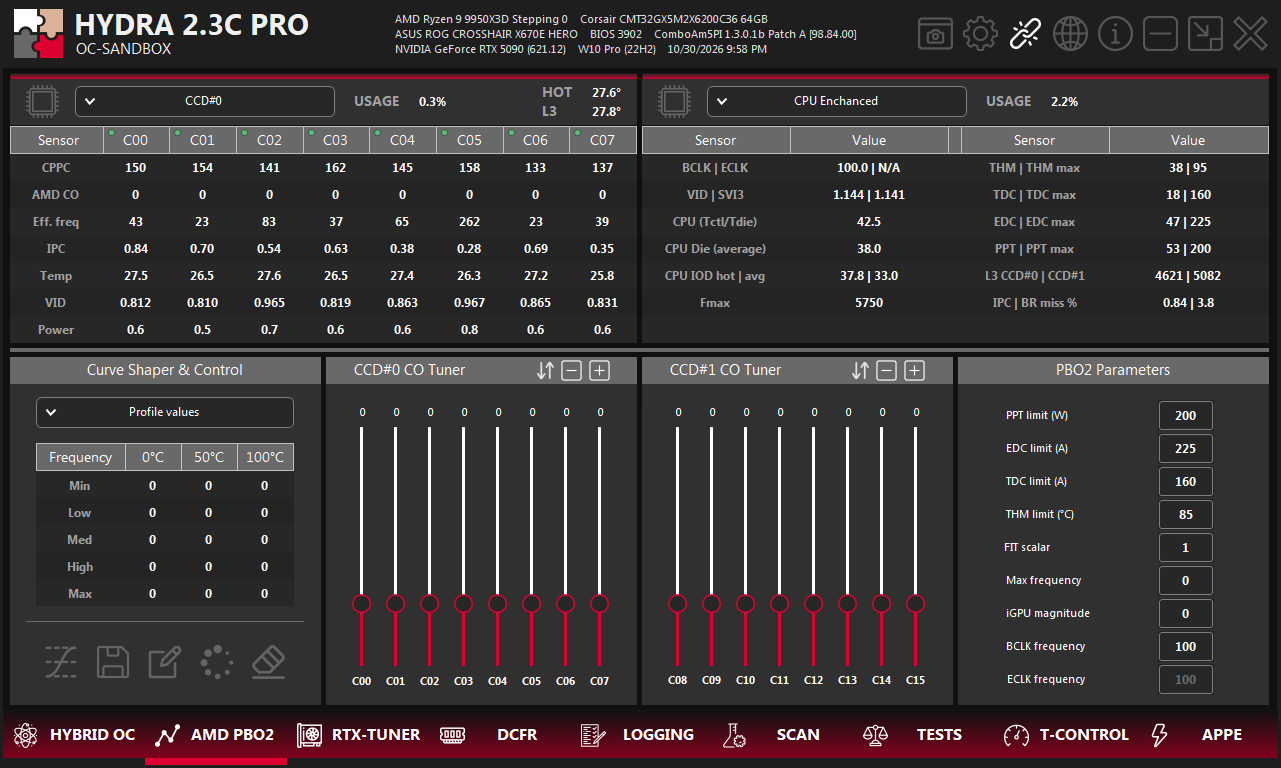
- 1AMD PBO2. The tab on the bottom bar of HYDRA.
- 2Cores. Per-core table for the CCD chosen in the list: CPPC rank, AMD CO in use, effective clock, IPC, temperature, VID and power.
- 3Processor. Clocks, voltages and temperatures, and each limit next to its current value: THM, TDC, EDC, PPT.
- 4Curve Shaper. Offsets by frequency region and temperature. See Curve Shaper.
- 5Profile buttons. Profile on/off, save, back up, load backup, reset.
- 6CCD buttons. Set every core of this CCD to 0, or move all of them by −1 or +1.
- 7Curve Optimizer. One slider per core, C00–C15.
- 8PBO2 Parameters. Limits and reference clocks. See PBO2 Parameters.
- 9ECLK. Greyed out when the motherboard has no external clock generator.
Turn the profile on
| Button | What it does |
|---|---|
| Profile on/off | When on, HYDRA may apply the power, current, temperature, frequency, Curve Optimizer and Curve Shaper values of this tab. When off, the saved values stay, but the profile is not used. |
| Save | Writes the current AMD PBO2 settings to the CPU profile file. |
| Back up | Creates a backup of the CPU profile file. |
| Load backup | Loads CPU profiles from the backup and replaces unsaved changes. |
| Reset | Resets every AMD PBO2 value on this tab. |
PBO2 Parameters
| Field | What it does |
|---|---|
| PPT limit (W) | Total package power budget. Lower means less heat and less long-load performance; higher helps only when cooling and the other limits allow. |
| EDC limit (A) | Short peak current. Mostly affects brief boost bursts; tune it together with PPT and TDC. |
| TDC limit (A) | Sustained current for long multithreaded loads. Raising it does not help when another limit is already active. |
| THM limit (°C) | Temperature ceiling, 31–95 °C. Boost drops as the CPU approaches it. |
| FIT scalar | From 1 to 10. Relaxes the CPU's reliability voltage guard for longer boost. More voltage, heat and long-term stress; keep the default unless you validate the profile. |
| Max frequency (MHz) | Boost ceiling. The CPU still clocks by load, temperature, voltage and the limits above. |
| iGPU magnitude | Curve Optimizer for the integrated graphics, from −50 to +50. Negative lowers its voltage curve; too far causes graphics errors. |
| BCLK frequency (MHz) | Base clock, 96–105 MHz. It also moves memory, fabric and buses, so change it in small steps and test the whole system. |
| ECLK frequency (MHz) | External CPU reference clock, 95–120 MHz. Moves the CPU clock more independently than BCLK, only on motherboards with an external clock generator. |
Curve Optimizer
Each slider sets the Curve Optimizer value of one core. A negative value lowers the core's voltage curve, which can free boost headroom; too far makes the core unstable. The AMD CO row of the core table shows the value the core uses right now.
- The buttons in each CO Tuner header act on the whole CCD: set every core to 0, or move every core by −1 or +1.
- The values found by SCAN CPU land here.
Curve Shaper
Curve Shaper adds an offset for each frequency region (Min, Low, Med, High, Max) at each temperature zone (0 °C, 50 °C, 100 °C). HYDRA applies it on the fly on Ryzen 9000 processors.
- Current values shows what the processor uses right now.
- Profile values shows what the HYDRA profile stores, for editing or comparison.
- Switching the view does not apply anything by itself.
Check the result
- The processor summary shows each limit next to its current value (THM | THM max, TDC | TDC max, EDC | EDC max, PPT | PPT max).
- Some motherboards cap PBO2 values. If you set more than the board allows, the summary shows the value the processor actually uses.
- To measure the gain, run TESTS → Cinebench R23 DEFAULT vs AMD PBO2.
Something wrong or missing on this page? Tell us in Discord.